
To edit an image by API, send it with an instruction to mai-image-2.7-flash on Tchavi: one edit costs about 29 credits, about KES 2.1 on 24 November 2026 (24.975 credits for the image, about 4 for a 720 x 900 reference). No bank card: you pay with mobile money, with no KYC, and the same key opens over 100 models. On a fictitious invoice, a single prompt changed one quantity and two totals: all three changes came out exact, in 9.29 seconds (one run).
Prices move, so read the current one on the model page before you call. The model is a public preview from Microsoft, announced on 17 November 2026, so its behaviour can change. KES figures use the rate read on 2026-11-10 (1 credit ≈ KES 0.07385), which moves with the market.
In short
- Tchavi is an OpenAI-compatible AI API gateway you pay for with mobile money. An image edit is one
POST https://tchavi.com/api/v1/images/generationscall with your image in theimagesfield. - Prices read on 24 November 2026:
mai-image-2.7-flashat 24.975 credits per image, plus about 4 credits for a 720 x 900 reference, so about 29 credits (about KES 2.14).mai-image-2.7at 84.254 credits, plus about 12, so about 97 credits (about KES 7.13). - Measured on 24 November 2026, one run each: both models returned all three edits exact. Flash took 9.29 s,
mai-image-2.7took 17.52 s. - Up to five references, JPEG or PNG. No size or quality setting: you pick the shape with
aspect_ratio, orautoto follow your reference. - No bank card: mobile money, no KYC, one key (countries and operators).
Can you edit an image by API without a bank card?
Yes. You top up your account with mobile money, there is no card and no KYC to provide, and there is no subscription. The live list of countries and operator connections is on the payments page: read it the day you sign up, because it changes.
The edit itself is nothing special: it is the image generation call, with your reference images added. The image docs describe the request body shared by every image model.
What did we measure, and what did we not do?
The test: a fictitious invoice from a shop in Cotonou, one prompt written in French. Here are the input image and the result from mai-image-2.7-flash: input and output. The request: change the "Sandales cuir" line from 1 to 2 pairs, its total from 6,500 to 13,000, and the grand total from 35,500 to 42,000, touching nothing else.
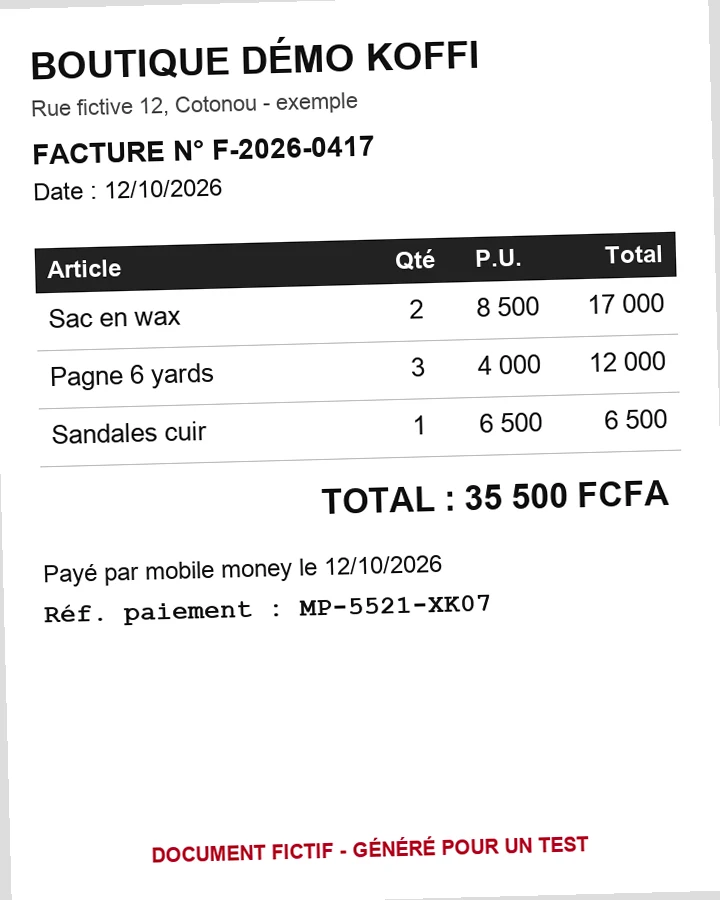
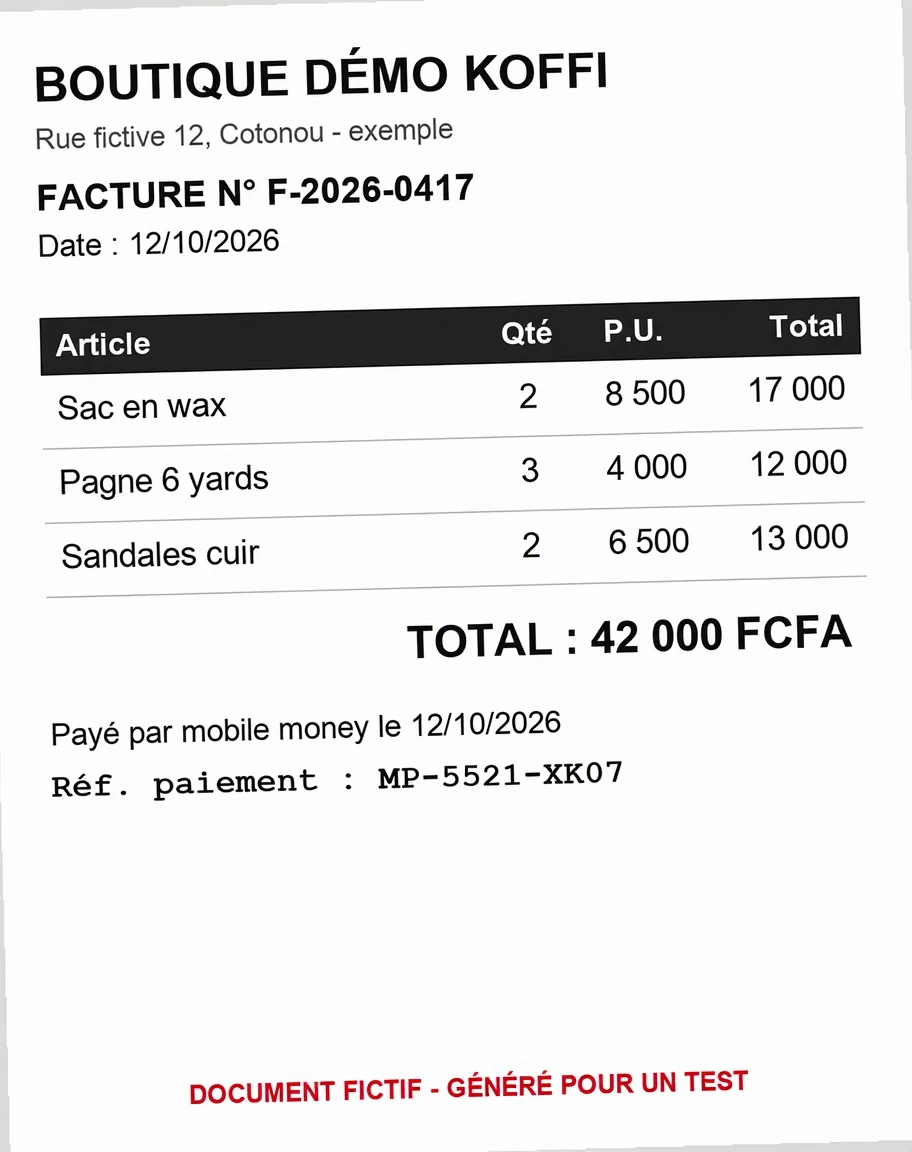
| On 24 November 2026, one run each | mai-image-2.7-flash | mai-image-2.7 |
|---|---|---|
| The three edits | exact | exact |
| Time, from send to image | 9.29 s | 17.52 s |
| Price per image (credits) | 24.975 | 84.254 |
| One 720 x 900 reference (credits) | about 4 | about 12 |
| Total for one edit (credits) | about 29 | about 97 |
| Total for one edit (approx. KES) | about KES 2.14 | about KES 7.13 |
For mai-image-2.7-flash, the other text on the invoice (the two other lines, the header, the date, the payment notice) kept its words and accents, checked by eye. About 92% of the pixels outside the edited areas stayed within 8/255 or less, after shrinking the output (912 x 1,152) back to the input size: that is a floor, since the resize itself costs part of the 8%.
Two limits to read before you trust these numbers:
- The measurements were made directly on the model's host, so the times are not the ones you will see through Tchavi, not through Tchavi. The credit prices come from the Tchavi catalogue of 24 November 2026; they are not read off an invoice on your account.
- The code below was not run for this article. Its request shape comes from Tchavi's documentation and validation code. Read
X-Credits-Usedon your first call: that is the real cost.
One run per model is not a statistic, and the prompt was in French: we say nothing about other languages.
How do you call the API, step by step?
Step 1: get a key
Create your account, then an API key. The quickstart and the authentication page show how. Put the key in an environment variable, TCHAVI_API_KEY, never in your code.
Step 2: top up with mobile money
Top up from the billing page with your country's operator. The page shows the minimum for the day. At 29 credits per edit, KES 250 covers roughly 115 edits on mai-image-2.7-flash (about 3,385 credits divided by 29, a calculation, not a measurement).
Step 3: write the instruction
Put it in a file called prompt.txt. This is the one from our test, kept in French exactly as we sent it:
Cette boutique corrige sa propre facture : le client a finalement pris une deuxième paire de sandales. Sur la ligne « Sandales cuir », passe la quantité de 1 à 2 et, dans la colonne Total, de 6 500 à 13 000 ; le prix unitaire reste 6 500. Passe le total général de « TOTAL : 35 500 FCFA » à « TOTAL : 42 000 FCFA ». Garde exactement la même police, la même taille, le même alignement et la même inclinaison. Ne modifie rien d'autre : ni les deux autres lignes, ni l'en-tête, ni la date de la facture, ni la mention « Payé par mobile money le 12/10/2026 », ni la référence de paiement, ni la mention « DOCUMENT FICTIF - GÉNÉRÉ POUR UN TEST ».
In English it says: the shop corrects its own invoice because the customer took a second pair of sandals; set the quantity from 1 to 2 and the line total from 6,500 to 13,000, keep the unit price, set the grand total from 35,500 to 42,000, keep the same font, size, alignment and slant, and change nothing else. We did not test an English prompt.
Put your own image in invoice.png (JPEG or PNG, according to Microsoft, is what this model accepts). For a JPEG, replace image/png with image/jpeg in the data: address..
Step 4: call it, in curl, Node or Python
curl
base64 < invoice.png | tr -d '\n' > invoice.b64

jq -n --rawfile p prompt.txt --rawfile i invoice.b64 '{
  model: "mai-image-2.7-flash",
  prompt: ($p | rtrimstr("\n")),
  images: [("data:image/png;base64," + $i)],
  aspect_ratio: "auto"
}' > request.json

curl -X POST https://tchavi.com/api/v1/images/generations \
  -H "Authorization: Bearer $TCHAVI_API_KEY" \
  -H "Content-Type: application/json" \
  -d @request.json \
  -D headers.txt -o response.json

jq -r '.data[0].b64_json' response.json | base64 -d > invoice-fixed.png
grep -i x-credits-used headers.txt
Node.js
import { readFileSync, writeFileSync } from 'node:fs';

const res = await fetch('https://tchavi.com/api/v1/images/generations', {
  method: 'POST',
  headers: {
    'Content-Type': 'application/json',
    Authorization: `Bearer ${process.env.TCHAVI_API_KEY}`,
  },
  body: JSON.stringify({
    model: 'mai-image-2.7-flash',
    prompt: readFileSync('prompt.txt', 'utf8').trim(),
    images: ['data:image/png;base64,' + readFileSync('invoice.png').toString('base64')],
    aspect_ratio: 'auto',
  }),
});
const json = await res.json();
if (!res.ok) throw new Error(`${json.error}: ${json.message}`);

const image = json.data[0];
const ext = image.media_type.split('/')[1]; // png, jpeg or webp
writeFileSync(`invoice-fixed.${ext}`, Buffer.from(image.b64_json, 'base64'));
console.log('credits:', res.headers.get('x-credits-used'));
Python
import base64
import os

import requests

with open("invoice.png", "rb") as f:
    reference = base64.b64encode(f.read()).decode()
with open("prompt.txt", encoding="utf-8") as f:
    prompt = f.read().strip()

r = requests.post(
    "https://tchavi.com/api/v1/images/generations",
    headers={"Authorization": f"Bearer {os.environ['TCHAVI_API_KEY']}"},
    json={
        "model": "mai-image-2.7-flash",
        "prompt": prompt,
        "images": ["data:image/png;base64," + reference],
        "aspect_ratio": "auto",
    },
    timeout=120,
)
data = r.json()
if not r.ok:
    raise RuntimeError(f"{data['error']}: {data['message']}")

image = data["data"][0]
ext = image["media_type"].split("/")[1]  # png, jpeg or webp
with open(f"invoice-fixed.{ext}", "wb") as f:
    f.write(base64.b64decode(image["b64_json"]))
print("credits:", r.headers.get("x-credits-used"))
The required fields are model and prompt. Here aspect_ratio: "auto" asks the model to follow the shape of your reference. With no reference, pick a shape from 1:1, 4:3, 3:4, 16:9, 9:16, 3:2 and 2:3.
Step 5: read the image and the cost
The image is in data[0].b64_json as base64, its type in data[0].media_type. Read the type instead of assuming PNG: in our test the model returned a PNG, but the format depends on the model. The exact cost of the call is in the X-Credits-Used header.
How do you write the prompt so the rest stays put?
Our prompt has three parts, and that is the shape to copy:
- What to change, with the value before and the value after. "From 1 to 2", "from 6,500 to 13,000", "from 35,500 to 42,000".
- What must stay identical inside what you change. "The same font, size, alignment and slant." And what stays next to it: "the unit price stays 6,500".
- What not to touch, named one by one. The other lines, the header, the date, the payment notice, the reference.
Say what to change and what to keep, never only the first. And read the result before you use it: on a document, a wrong digit is hard to spot.
What if your image is online, instead of reading it as base64?
The images field accepts base64 data: addresses or public https links. According to the documentation, a request body can be up to 50 MB and base64 adds about a third to each image: for large or many images, send links.
{
  "model": "mai-image-2.7-flash",
  "prompt": "…",
  "images": ["https://example.com/invoice.png"],
  "aspect_ratio": "auto"
}
The link must point to a JPEG or a PNG, and our server must be able to open it. In the other direction, "response_format": "url" returns a link valid for 24 hours instead of base64, according to the documentation (we did not try it on this model).
What errors can you run into?
These refusals come from Tchavi's validation, before anything is charged:
| What you send | Response | What it means |
|---|---|---|
A resolution field | 400 | This model has no resolution: remove the field |
More than five images in images | 400 | "Maximum 5 input images allowed." |
n above 1 | 400 invalid_parameter | One image per request: repeat the call |
An aspect_ratio outside the list | 400 | The message lists the accepted shapes, plus auto |
| A reference the server cannot read | 400 invalid_parameter | The message names the reference: check link or format |
No prompt | 400 | The prompt field is required |
image and images together | 400 | Send one or the other |
The other codes are on the errors page: 401 for a wrong key, 402 when the balance is too low, 429 when you call too fast.
Flash or mai-image-2.7: which one to pick?
Start with mai-image-2.7-flash: on our invoice it gave all three edits exact, in 9.29 s against 17.52 s, for less than a third of the price per image (24.975 against 84.254 credits). Move to mai-image-2.7, which Microsoft presents as its precision tier, when precision matters more than price and Flash missed your case. The full test of both is in MAI-Image-2.7 vs Flash: an invoice editing test. One run each: repeat the test with your own images.
For the prices across the whole range, the pricing page and each model page show the price of the day.
FAQ
Can you edit an image by API without a bank card?
Yes. On Tchavi you top up your account with mobile money, with no bank card and no KYC, and one API key opens over 100 models, including the ones that edit images. The available countries and operators are listed on the payments page of the documentation.
How much does an image edit by API cost?
On 24 November 2026, about 29 credits with mai-image-2.7-flash (24.975 for the image, about 4 for a 720 x 900 reference), roughly KES 2.14 at the rate read on 2026-11-10 (1 credit ≈ KES 0.07385). With mai-image-2.7, about 97 credits, roughly KES 7.13. Read the current price on the model page, and the real cost of your call in the X-Credits-Used header.
Which model should you pick to edit an image?
Start with mai-image-2.7-flash: on our invoice test, one run each, both models returned all three edits exact, Flash in 9.29 seconds and mai-image-2.7 in 17.52. Move to mai-image-2.7 if your case needs more precision and Flash fails.
How many reference images, and which formats?
Up to five references, as JPEG or PNG, as base64 or a public https link. Each reference is billed on top according to its size: about 4 credits for 720 x 900. A sixth reference returns a 400 error before anything is charged.
Can you choose the size of the resulting image?
Not with a size or resolution setting: a resolution field is refused with a 400 error, before anything is charged. You choose the shape with aspect_ratio (1:1, 4:3, 3:4, 16:9, 9:16, 3:2, 2:3) or auto to follow your reference. In our test, a 720 x 900 reference gave a 912 x 1,152 image.
Is the result guaranteed exact, for a document?
No. Our test is one run per model, on a fictitious invoice, with a prompt in French, and the model is a public preview. Read every image before you use it, especially the figures.
Create your account and top up KES 250
Going further: MAI-Image-2.7 vs Flash, the invoice test. Read next: generate and edit product images with the API.
This article is part of the series "Building an AI product from Africa". Tchavi is an OpenAI-compatible AI API gateway: one key gives access to over 100 text, image, audio and video models, and you pay for it with mobile money, no bank card (countries and operators). More guides on the blog. Follow us: LinkedIn and X.